舞台スケッチStage Sketch

ブラウザ対応Runs in the browser ネイティブMac版はベータ版対象外Native Mac app: not included in beta

舞台の立ち位置と動線を、客席からの正面図と真上の平面図で同時に描くツールです。A tool for drawing stage positions and movement in a front view and a plan view that move together.

限られたステージ利用時間はもっと質の高い練習へ。The shortest line between imagining and doing.

体験版を使ってみるTry the preview

登録不要・保存されません・PC推奨。演者3人/セット2つまで。製品版の機能も錠つきで見えます。No sign-up, nothing is saved, best on a computer. Up to three performers and two set pieces; the full version's features stay visible, locked.

製品版ベータを使ってみたいRequest access to the full beta

ベータ期間中は無償。お問い合わせ制です。Free during the beta. Access on request.

ディレクターDirector
頭の中にある絵を、目に見える形に。そのまま演者へ渡せます。Make the picture in your head visible, and hand it straight to the performers.
アーティストArtist
立ち位置は、場当たりの前に。稽古場の時間を、もっと繊細なところへ使えます。Positions settled before the blocking rehearsal. Rehearsal time goes to the finer work.

注意点Please note

舞台スケッチは技術図面ではなく、安全を検証したり保証したりするものでもありません。 ディレクターとアーティストの意思疎通を円滑にし、良いショーを作る時間を増やすためのスケッチです。 体験版で描いたものは保存されません。Stage Sketch is not a technical drawing, and it does not verify or guarantee safety. It is a sketch, meant to help a director and performers understand each other and spend more time making a good show. Nothing you draw in the preview is saved.

13の機能を、ひとつずつ。Thirteen features, one by one.

製品版(β)の画面です。体験版で開いているのは、このうち一部です。These screens are from the full beta. The preview opens only some of them.

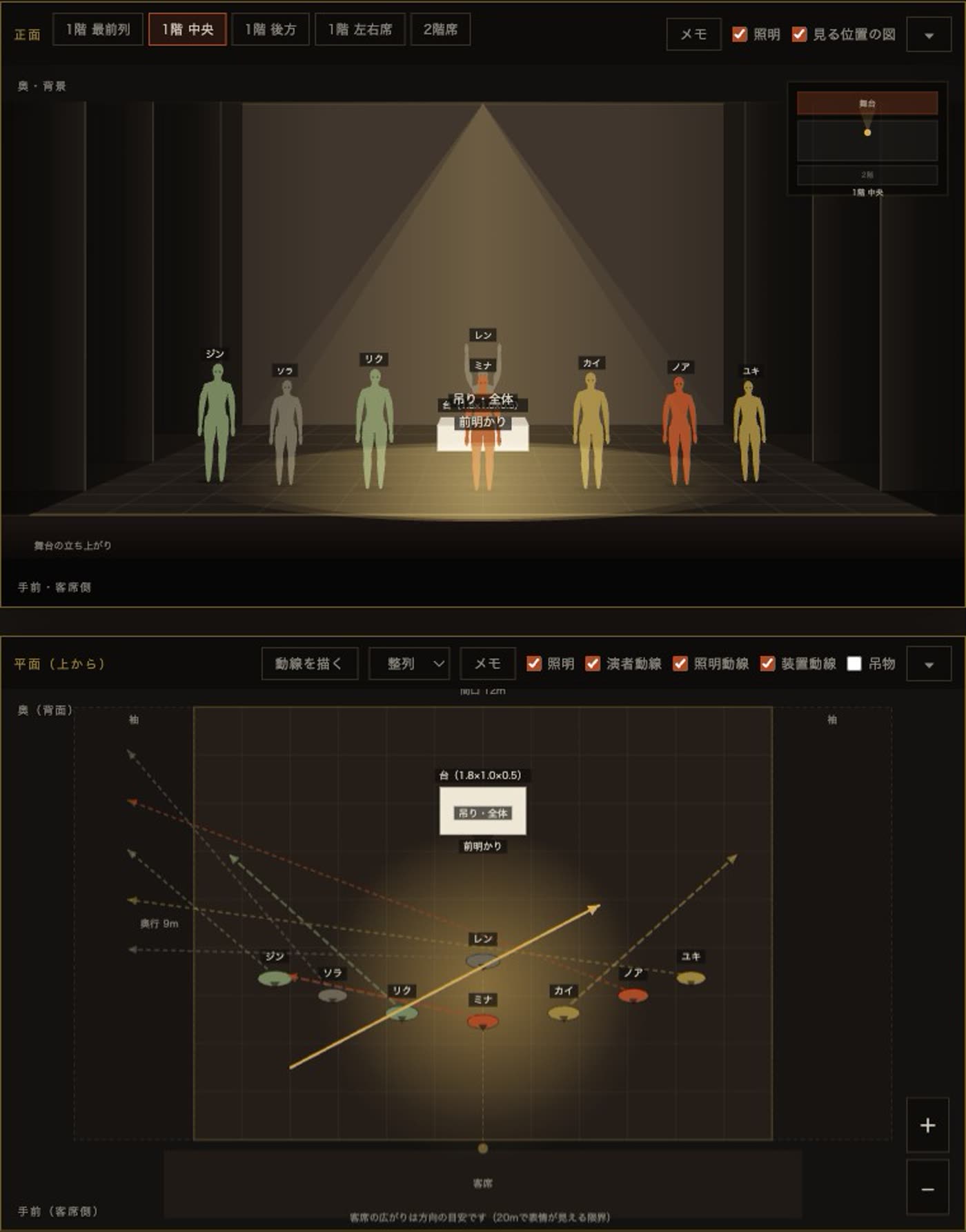
  1. 正面図と平面図が連動して動く様子

    01

    連動して動く正面図と平面図。A front view and a plan view that move together.

    演者やセットを動かせば、客席から見た正面図と、真上からの平面図が同時に変わります。Move a performer or a set piece, and both views update at once: the front view as the house sees it, and the plan view from above.

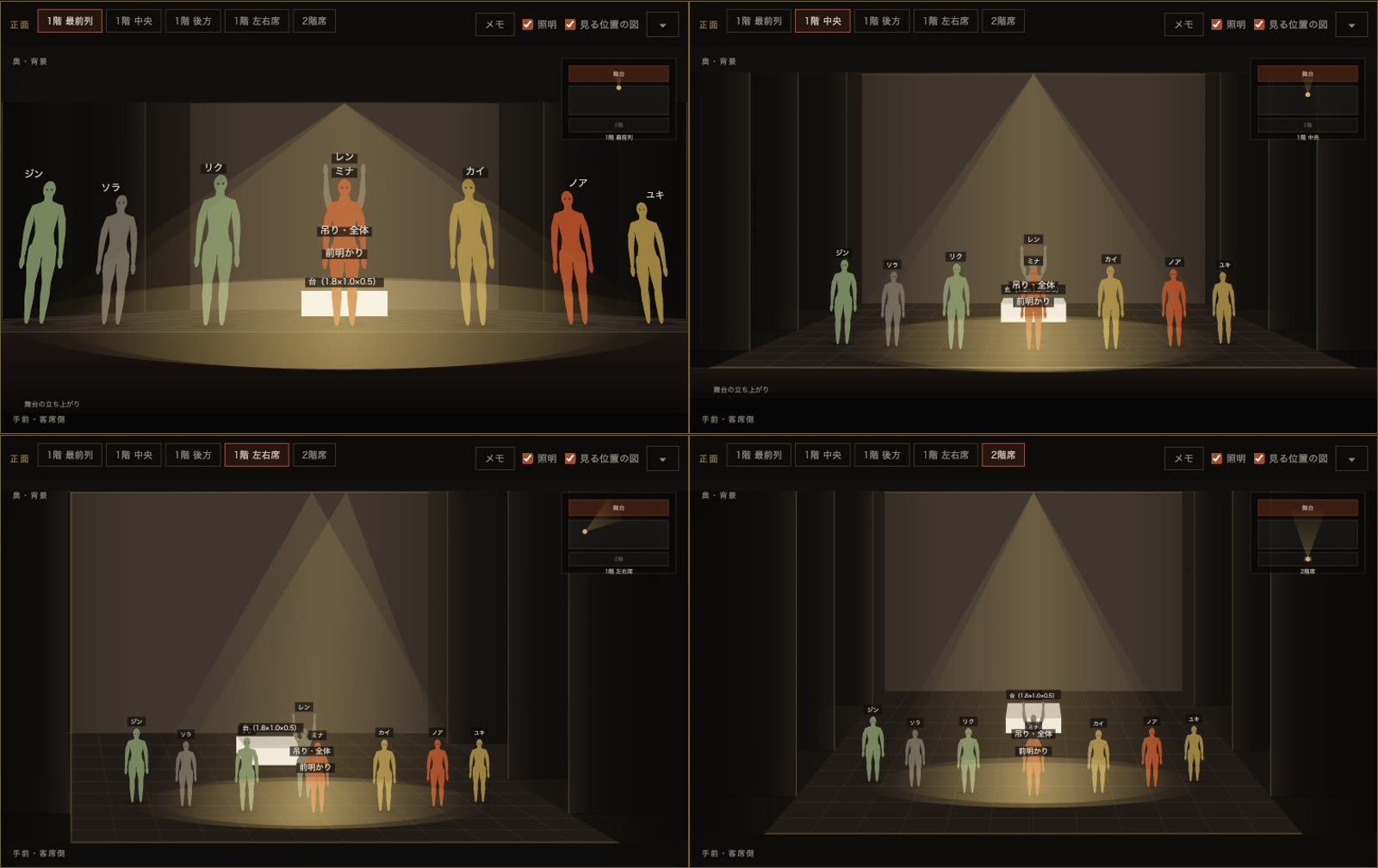
  2. 2階席と1階左右席から見た同じ場面

    02

    客席のどこから見るかを選べる。Choose your viewpoint in the house.

    1階の最前列・中央・後方・左右席、そして2階席。同じ場面を様々な位置から見ることで、すべてのお客様を意識したショーづくりを。Front row, centre, rear, either side, or the balcony. View the same scene from different seats and build a show that works for everyone in the house.

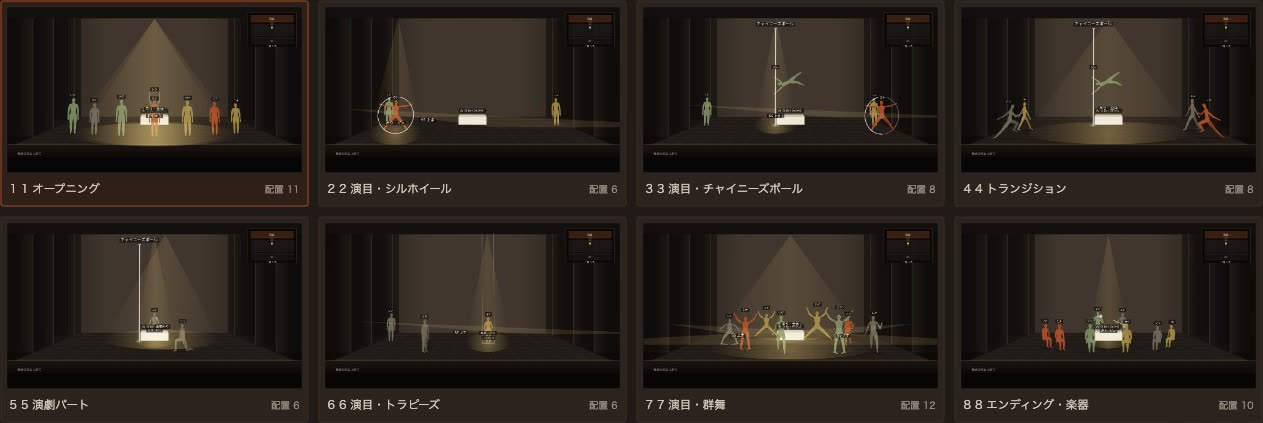
  3. 8つのシーンを並べた一覧

    03

    シーン一覧で表示する。View all scenes in a list.

    転換の長さや暗転にも対応、アニメーション機能もあります。Set the duration of each transition and its blackout, and play the change back as an animation.

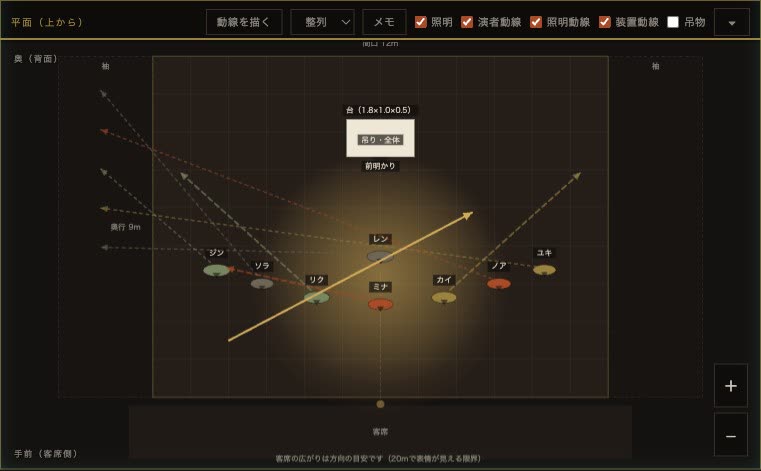
  4. 平面図に自動で描かれた動線と、手で描いた矢印

    04

    動線と矢印を描ける。Draw paths and arrows.

    次の場面への動きは動線として自動で描かれます。伝えたい指示は、矢印を描き足して残せます。Movement into the next scene is drawn automatically as a path. Add arrows to leave specific instructions.

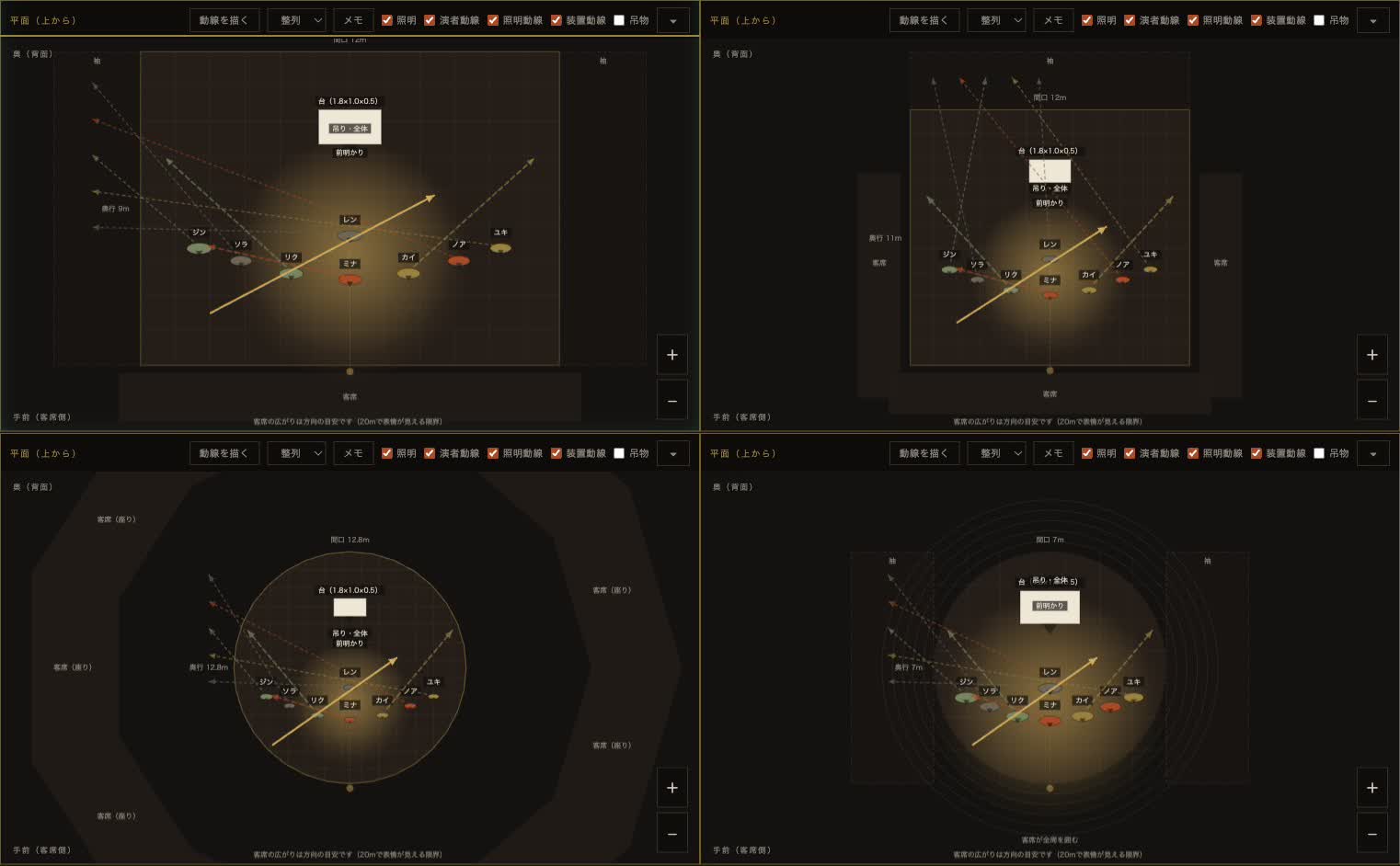
  5. プロセニアム・スラスト・TOHU・シャピトーの平面図

    05

    様々なステージを想定可能。Plan for different venue types.

    プロセニアム、スラスト、全周のアリーナ、シャピトー。置いた演者はそのままに、客席だけが動きます。寸法を入れて、自分の会場を作ることもできます。Proscenium, thrust, a big top in the round, or a touring chapiteau. Your performers stay in place while the house moves around them. You can also enter measurements to build your own venue.

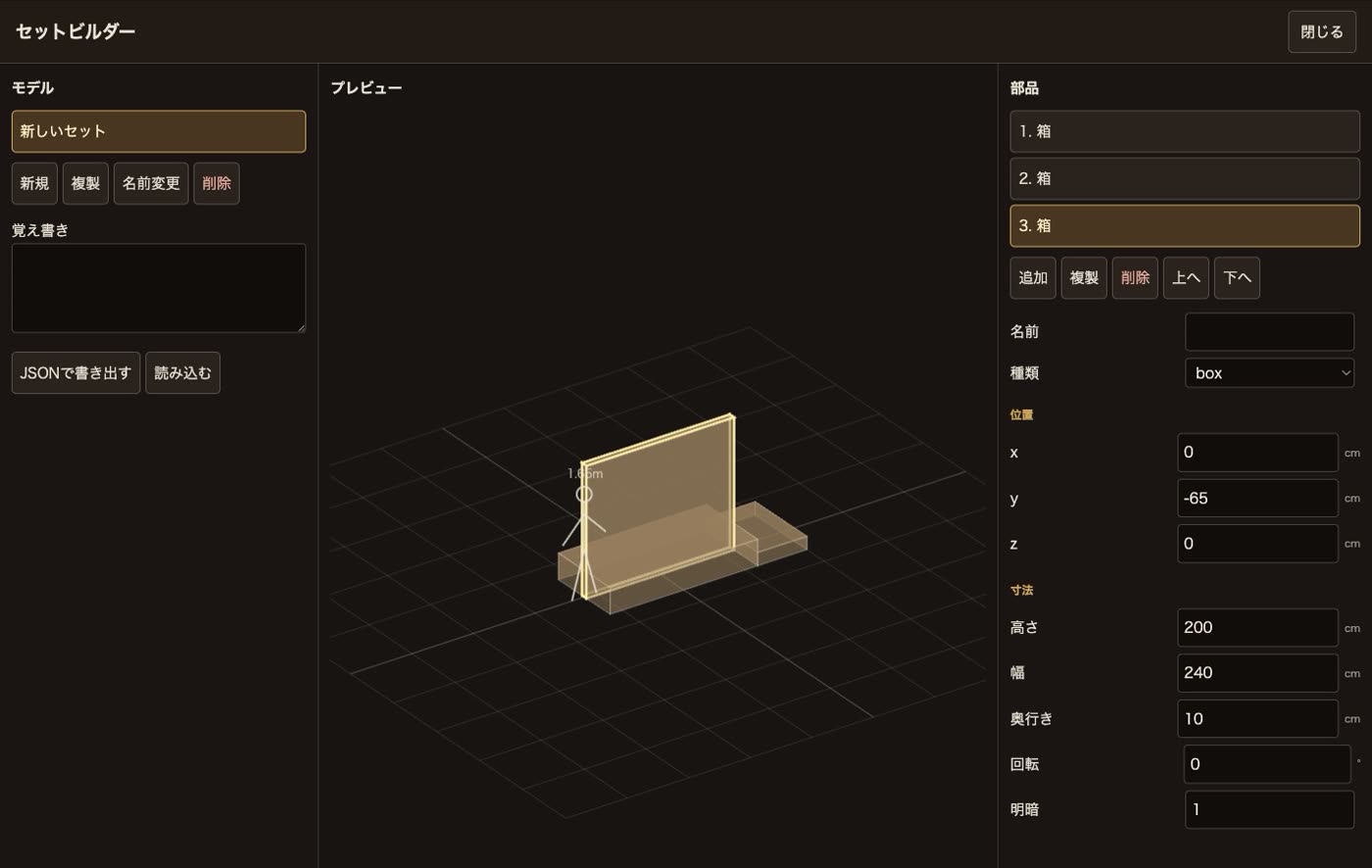
  6. 箱と板でセットを組む画面

    06

    舞台セットを組める。Build your own set.

    箱や板を組み合わせて、自分の装置を作ります。隣に立つ1.65mの人型が寸法の目安です。組んだものは名前をつけて残し、呼び出せます。Combine boxes and boards to build your own scenery. The 1.65 m figure beside it gives you the scale. Name what you build, save it, and use it again.

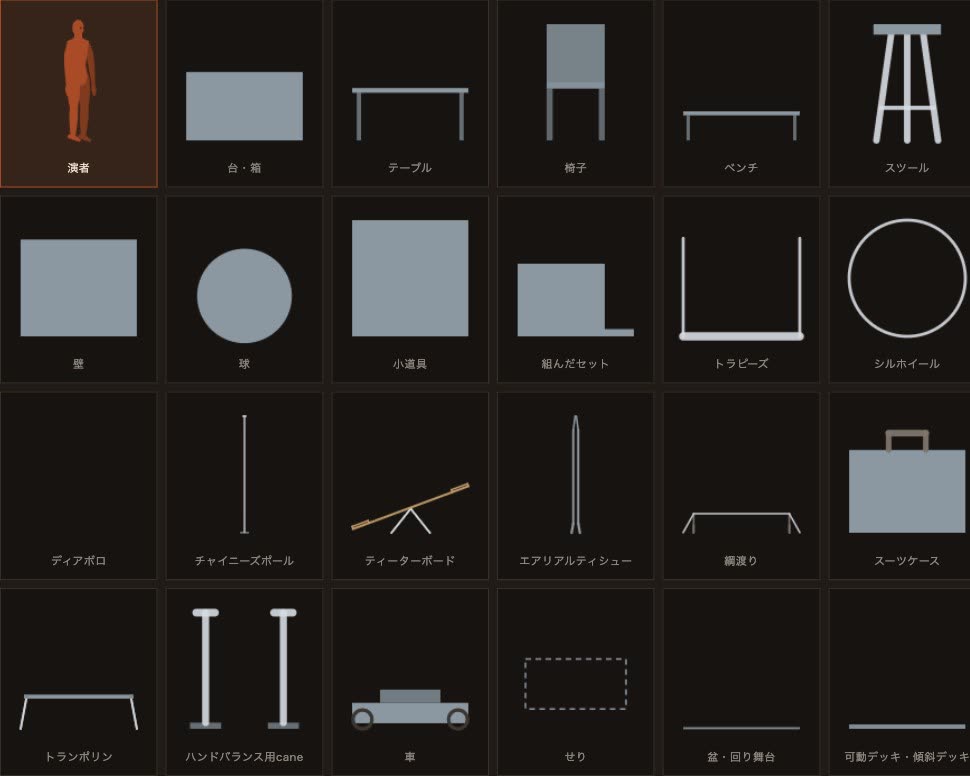
  7. 台・テーブル・トラピーズ・シルホイールなど種類の一覧

    07

    小道具と器具をそろえる。Props and apparatus, ready to place.

    台・テーブル・椅子・壁から、トラピーズ、シルホイール、エアリアルティシュー、チャイニーズポール、綱渡り、トランポリンまで。手に持つ小道具は、傘・クラブ・ボール・リング・刀など。From platforms, tables, chairs and walls to trapeze, Cyr wheel, aerial silk, Chinese pole, tightwire and trampoline. Hand props include umbrellas, clubs, balls, rings and swords.

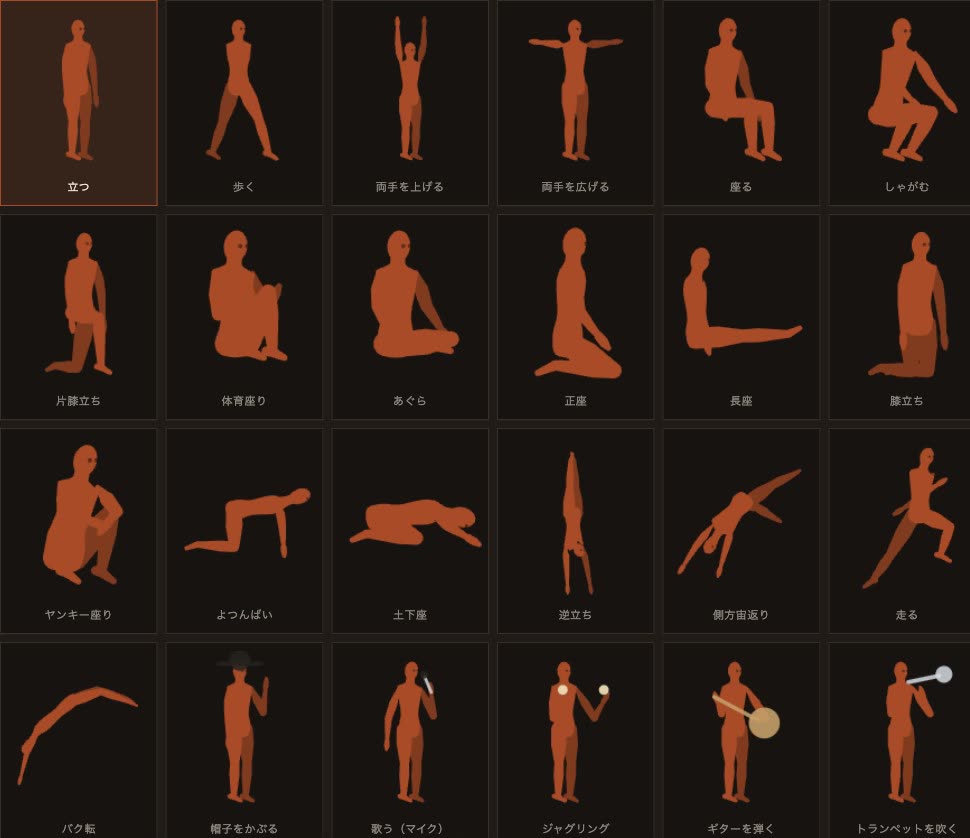
  8. 立つ・歩く・逆立ち・バク転などの姿勢の一覧

    08

    演者の姿勢、いろいろ。A wide range of poses.

    姿勢や方向を変えることはもちろん、様々な状況を用意しています。Change each performer's pose and facing, with stances ready for many different situations.

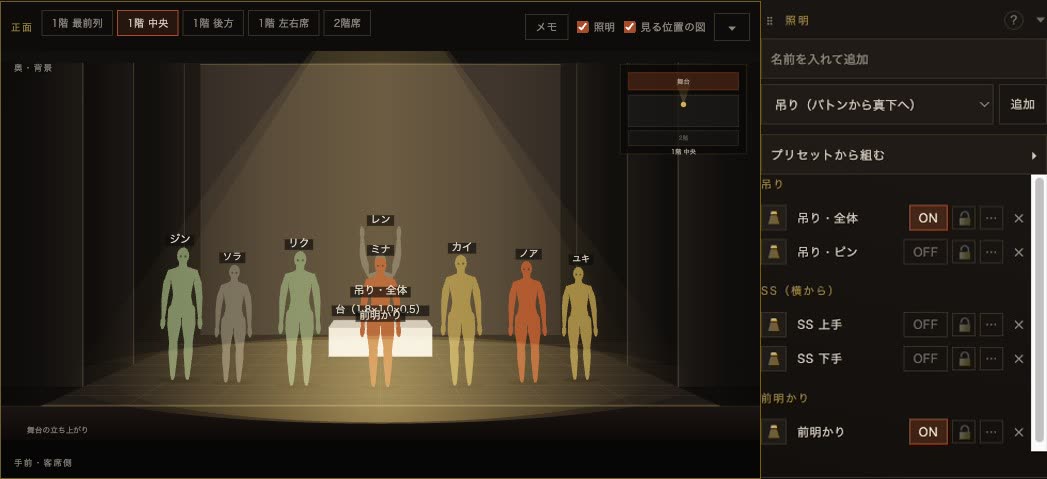
  9. 照明を選んだ正面図と、照明の欄

    09

    簡易的な照明をつくる。Add basic lighting.

    吊り・SS・前明かり・転がしの4種。灯体と、光の当たる場所を別々に掴んで動かせます。プリセットも用意してあります。Overhead, side, front and floor lights. Move each fixture and its focus point separately. Presets are also available.

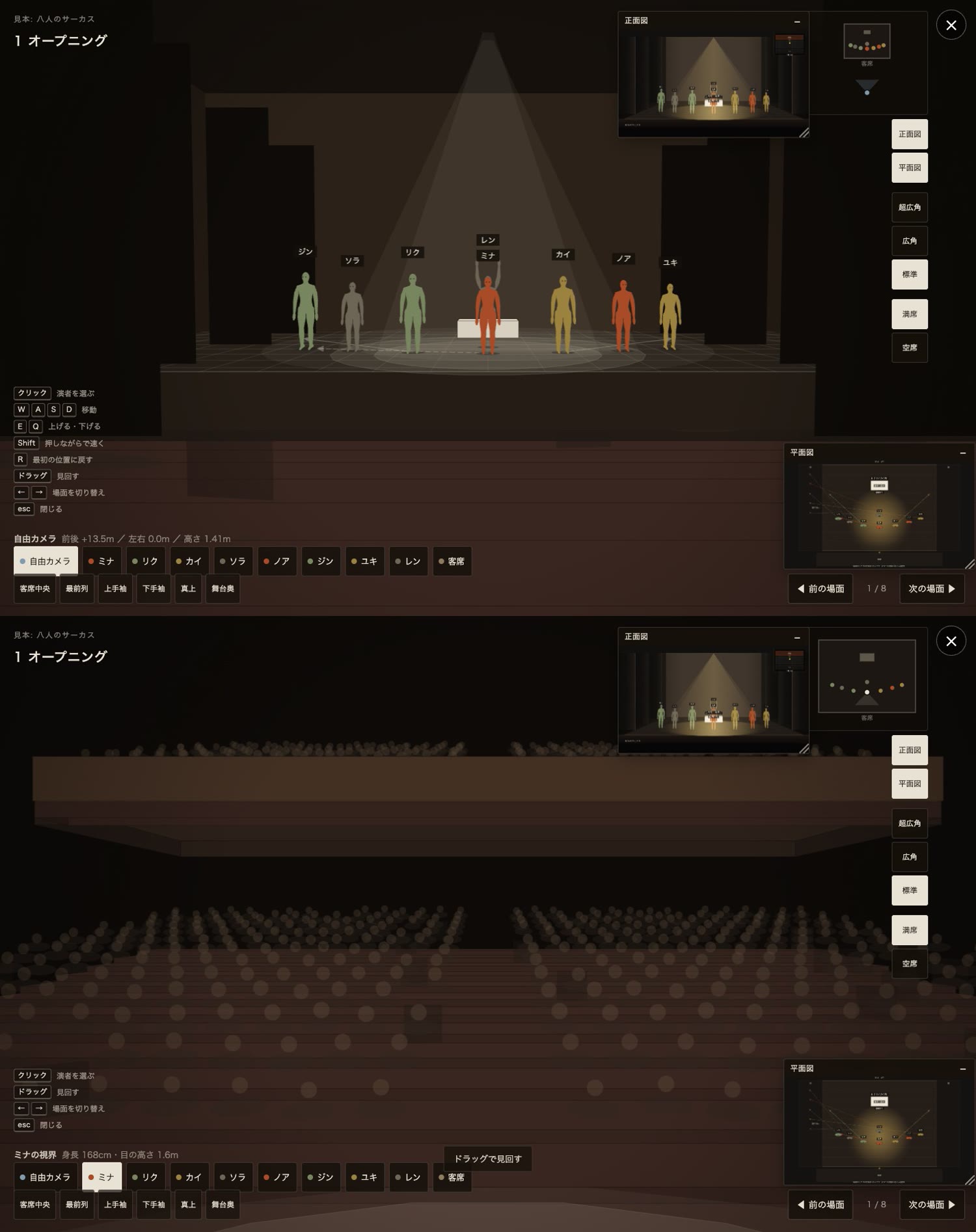
  10. 3Dカメラで客席中央から見た舞台と、演者の目線で見た客席

    10

    3Dカメラで舞台の中へ。演者の気持ちになれます。Take the 3D camera onto the stage and see it as a performer does.

    3Dモデルとしてみることができます。客席中央から、袖から、真上から。それぞれの演者を選べば、その視野を確かめられます。View the stage as a 3D model, from the centre of the house, the wings, or directly overhead. Select any performer to check their field of view.

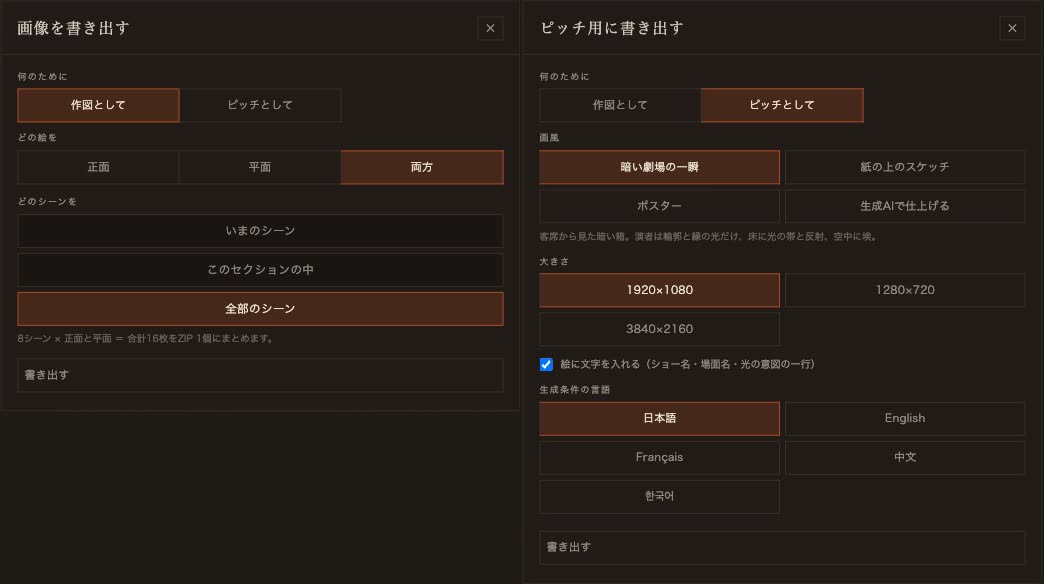
  11. 画像を書き出す窓(作図として/ピッチとして)

    11

    画像として書き出し可能。一部でも一括でも。Export as images — one at a time, or all at once.

    作図なら、正面・平面・両方を、いまの場面からショー全体まで一括で(見本では8場面×2枚=16枚をZIPひとつに)。ピッチ用なら画風4種、最大3840×2160で。For drawings, export the front view, the plan view or both, for one scene or the whole show, in a single ZIP (the sample gives 8 scenes × 2 = 16 images). For pitch material, choose from four visual styles at up to 3840 × 2160.

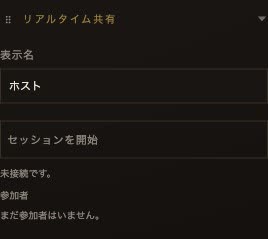
  12. リアルタイム共有の欄

    12

    オンラインで同じ場面を見ながら会議可能。Meet online while viewing the same scene.

    招待URLを送るだけで、全員でリアルタイムシェアができます。ホストは全機能使えます。ゲストはレーザーポインタと矢印の描画のみです。Send an invite link and everyone sees the same scene in real time. The host has full access; guests can only use the laser pointer and draw arrows.

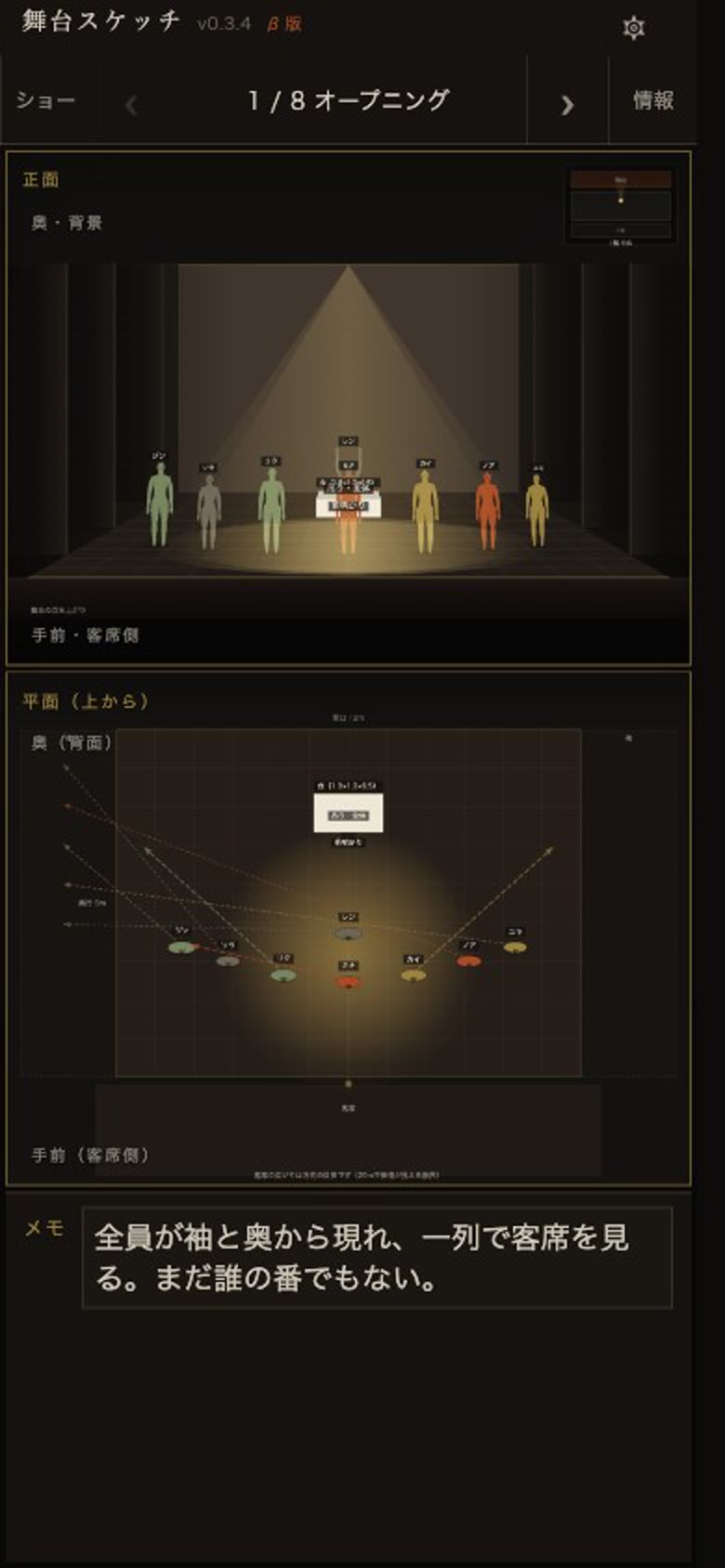
  13. iPhoneで見た1場面目の正面図・平面図・説明メモ
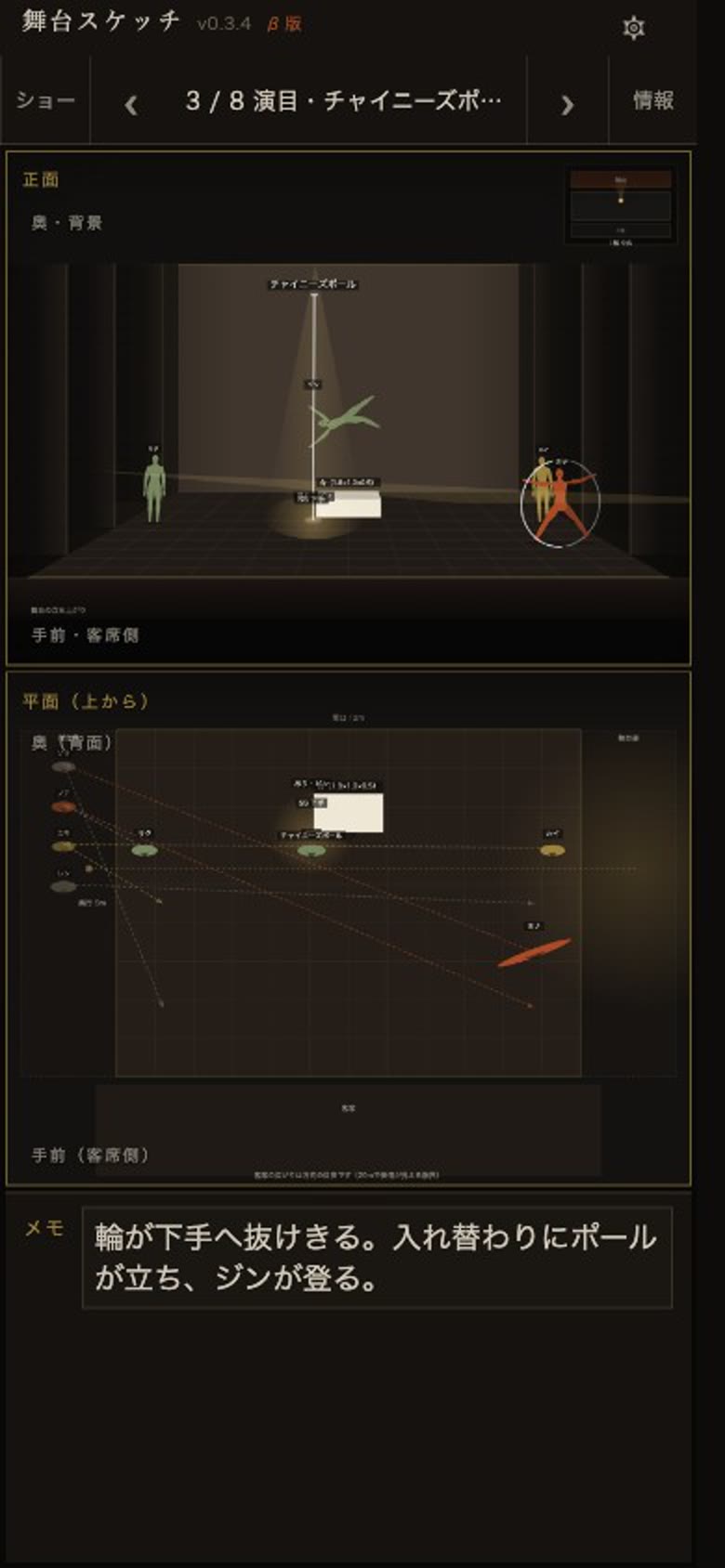
    iPhoneで見た3場面目の正面図・平面図・説明メモ

    13

    iPhoneで、稽古の前に覚えておく。Learn your positions on your iPhone before rehearsal.

    演者は自分のスマホで、場面を順に送りながら立ち位置と説明メモを確かめられます。稽古場に着いたときには、もう頭に入っている状態にできます。Performers can step through the scenes on their own phone, checking their positions and the notes for each one. They arrive at rehearsal with the sequence already in their heads.

このアプリについてAbout this app

製品版ベータについて詳しく →More about the full beta →

私は10年以上、幸運にもいくつもの素晴らしいショーに沢山演者として関わることをさせていただきました。一人の演者として、素晴らしいディレクターの意図をどれだけ把握して観客に届けることができるのかが常に私の戦いでした。このアプリは、そんな私がこれがあったらよかったのに、を盛り込んだアプリです。For more than ten years I have been fortunate to perform in one wonderful show after another. As a performer, my constant challenge was to grasp a great director's intention and carry it to the audience. This app brings together everything I wished I had had along the way.

芸術という抽象的なものにおいて、意思疎通を言葉だけで行うことは非常に難しいものです。ディレクターが見せたいものをアーティストが表現しようとするとき、その意図を理解することに時間を取られすぎることもありました。Art is abstract, and words alone are often not enough. When performers try to express what a director wants to show, too much time can go into working out what that vision is.

私は新しい劇場に入るたびに客席を歩き回り、それぞれの場所から自分がどのように見えるかをイメージします。俯瞰図では、人や物の位置と全体のバランスを第三者の目で捉えられます。正面図では、お客さんやディレクターから舞台がどう見えるかを考えられます。演者はこれらを常に頭の何処かで考え続けます。Whenever I enter a new theatre, I walk through the house and imagine how I will look from each seat. The plan view lets me step back and see where people and objects are placed, and how the whole stage balances. The front view shows what the audience, and the director, will actually see. A performer keeps both in mind, somewhere in the back of their head, all the time.

私はショーの世界が大好きです。だからこそ、準備不足のショーを見ると少しがっかりします。演者たちと事前に意図や配置を共有できればリハーサルの初期段階をより早く終え、その先の通し練習へ時間を使えます。そうしてショーを素晴らしいものとし、世界を少しだけ素晴らしいものにしてくれたら嬉しいです。I love the world of live shows, which is exactly why an underprepared one leaves me a little disappointed. If a director's intentions and everyone's positions are shared in advance, the early stages of rehearsal go faster, and more time is left for run-throughs. I hope this helps make shows better and, in a small way, the world too.

まず触る。もっと使う。Try the preview. Use every feature.

体験版 — ブラウザで、いまPreview — right now, in your browser

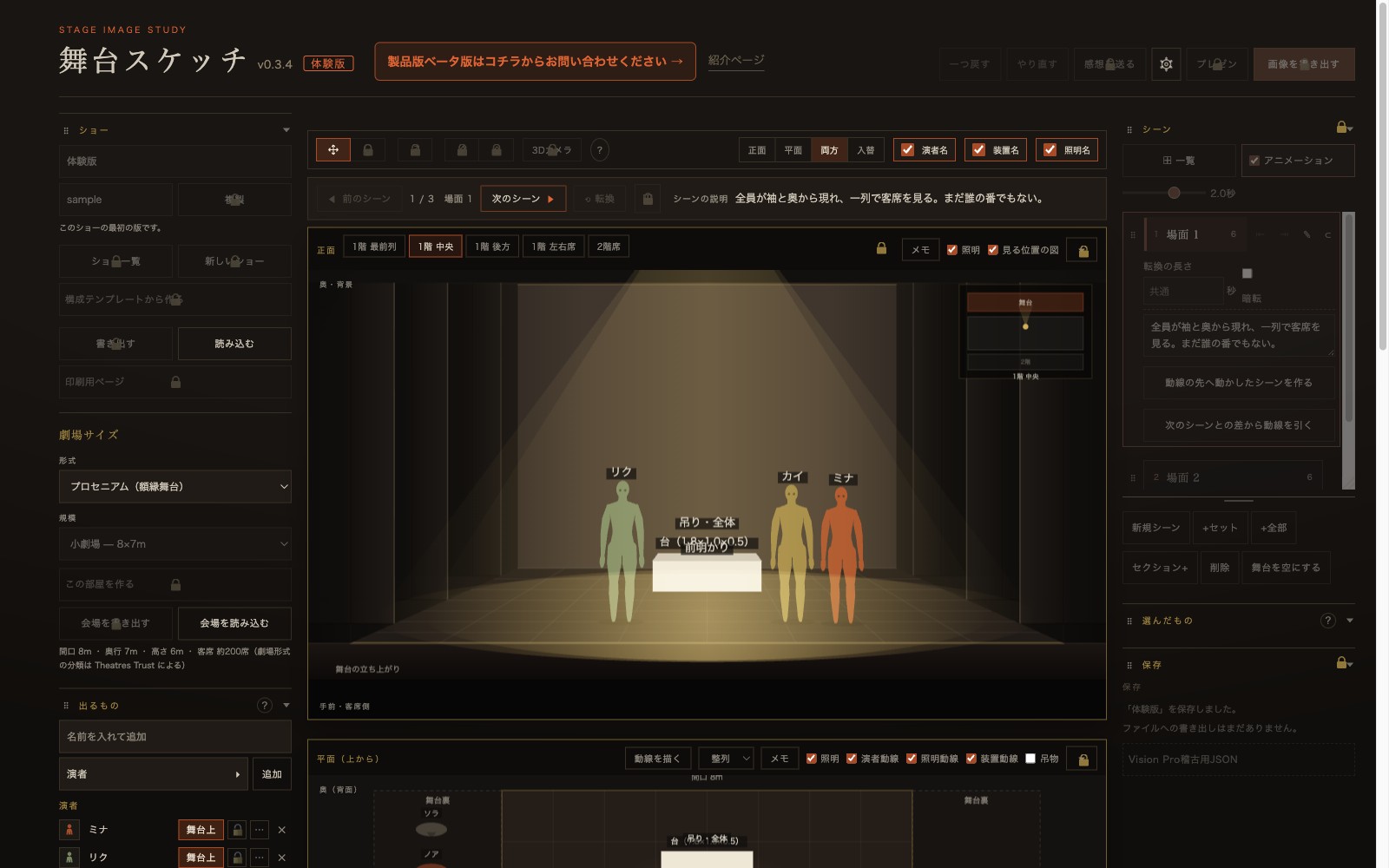
体験版の実際の画面。錠のかかったボタンもそのまま見える

錠の掛かった欄も、そのまま見えます。Locked panels stay visible, not hidden.

  • 正面図と平面図が連動して動くFront view and plan view move together
  • 客席5か所から見るSee it from five viewpoints in the house
  • 場面の切替と転換の再生Switch scenes and play back the transitions
  • 演者3人・セット2つまで、姿勢いろいろUp to three performers in a range of poses, plus two set pieces

体験版を使ってみるTry the preview

体験版はスマホでも開けますが、操作が限られます。PCでのご利用をお勧めします。You can open the preview on a phone, but some controls are limited. We recommend a computer.

製品版ベータ — 13の機能すべてFull beta — all thirteen features

製品版の3Dカメラで舞台の中に入った視点

3Dカメラ、照明、オンライン会議、書き出し。3D camera, lighting, online meetings and image export.

  • 人数・セット数の上限なしNo limit on performers or set pieces
  • 3Dカメラで演者の目線に入るSee the stage from a performer's point of view with the 3D camera
  • 招待URLで同じ場面を見ながら会議Share an invite link and view the same scene together
  • 画像として書き出し、一部でも一括でもExport as images, one at a time or all at once

Macでは Safari の「ファイル」→「Dockに追加…」で、ブラウザ版を独立したウィンドウで使えます(macOS Sonoma以降)。ネイティブMac版はベータ版の対象外です。On a Mac, choose File → Add to Dock… in Safari to use the browser version in its own window (macOS Sonoma or later). The native Mac app is not included in the beta.

製品版ベータを使ってみたいRequest access to the full beta

ベータ期間中は無償です。ボタンの先で、お問い合わせの手順をご案内します。Free during the beta. The next page explains how to get in touch.